Gifting Platform
The question
How do you turn a one-off gift buyer into someone who comes back for every occasion?
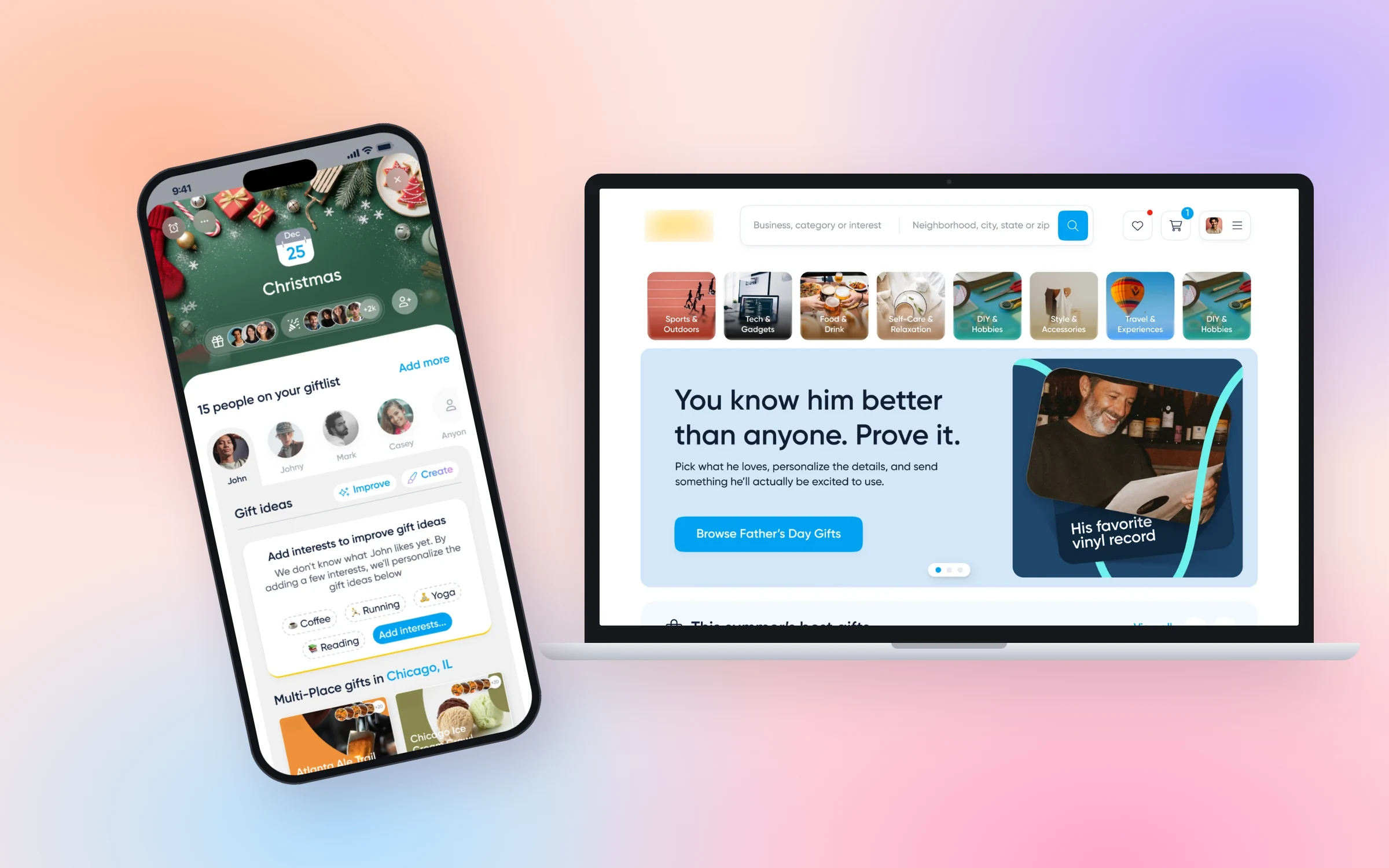
A US gifting platform where people send gifts to local restaurants, shops and experiences. As the lead designer embedded through Overspace, I redesigned the homepage and checkout, designed a calendar and contacts system that brings customers back for every occasion, and rebuilt the design system from Figma to code.
Confidential project. The client's name and some details are under NDA.
- of customers over more than ten years: the scale every change had to work at
- Millionsof customers over more than ten years: the scale every change had to work at
- flows designed and handed off across calendar, events and contacts
- 30+flows designed and handed off across calendar, events and contacts
- components documented in the coded design system, connected to Figma
- 15components documented in the coded design system, connected to Figma
01
Context
The platform sells gifts that work at thousands of local businesses: a single gift can be used at any restaurant in a city, a curated set of coffee shops, or one specific place. People buy for birthdays, holidays and thank-yous, often for several people at once.
I work with the founder and the product team day to day: shaping features from a brief or my own proposals, designing complex flows on desktop and mobile, prototyping, testing variants, reviewing builds in QA and keeping the design system and its documentation in sync with the code.
02
Problem and business goals
Gifting is occasional by nature: people arrive for one birthday, buy once and forget the site exists until the next one. The business needed people to find the right gift faster, check out with less friction, and come back for the next occasion on their own.
Business and product goals
- 01Make it faster to go from "I need a gift" to a gift that fits
- 02Reduce friction in a checkout with many delivery and personalisation options
- 03Turn one-off buyers into people who return for every occasion
- 04Give design and engineering one shared system, from Figma to code
03
Design
The work splits into four parts: helping people find a gift, buying it, remembering the next occasion, and knowing who they're buying for, all on one design system.
Alongside the flows, I created illustrations for the platform in Recraft, an AI design tool, keeping them in one consistent style.
Part 01
Homepage redesign
The old homepage explained how gifting works; the new one lets people start shopping. Category shortcuts sit at the top, a seasonal hero changes with the occasion, and curated rows show the best gifts and the businesses near you, so the first screen already answers "what should I get?"
Before
After
Part 02
A checkout built around the gift
Buying a gift means more decisions than buying a product: who it's for, how it's delivered (email, text, print or mail), when, and with which greeting card. I turned them into one page of short steps, each collapsing into a summary once done, with a live preview of the gift beside them and related gifts after adding to cart.
Part 03
Calendar: a reason to come back
The calendar keeps every occasion in one place: birthdays, holidays, seasons and custom events. Each event has its own page with the people you're buying for and gift ideas tailored to each of them, and reminders by email or text arrive before the date, so the next purchase starts with a nudge instead of a search.
Part 04
Contacts: everyone you buy for
Contacts work like a small gifting CRM. Each person has their important dates, locations and interests, plus their last gift and a one-tap "Gift again". When information is missing, people can ask the contact to fill it in themselves, and verified details are marked so recommendations get better over time.
Design-system decisions
- Semantic colour tokens
- Every colour is named for its job (text, surface, border, icon, state), so themed occasions can change the palette without touching components.
- One button system, four sizes
- Primary, secondary, danger and flat buttons with hover, active and disabled states, specified for mobile and desktop in both large and small sizes.
04
Testing and iteration
Bigger changes ship as experiments. On event pages we tested two ways to ask people for a contact's city, which makes local gift ideas possible.
How we tested
- A/B test
- A: suggested cities as one-tap chips inside the banner. B: a text link that opens a separate step. Variant A won.
- Design QA
- I review every build on real devices and file issues with repro steps, expected and actual results before release.
05
Outcome
The redesigned homepage, checkout, calendar and contacts are live, built on the shared design system. Detailed results are covered by an NDA and available on request.
Shipped
- —Homepage redesign
- —Checkout flow
- —Calendar, events and reminders
- —Contacts and gift preferences
- —Design System V2 with coded docs