Dat.ai
Dat.ai turns a plain-language request into a data workflow: describe what you need, and it finds, scrapes and enriches the data into a table you can export. I designed the product from the first prompt screen to the workflow editor, the automations library and its design system.
- from a sentence to a ready table: the core interaction the whole product is built around
- 1 promptfrom a sentence to a ready table: the core interaction the whole product is built around
- export formats from every result: CSV, Excel, JSON and HTML
- 4export formats from every result: CSV, Excel, JSON and HTML
- countries the platform now reaches with its residential network (dat.ai)
- 100+countries the platform now reaches with its residential network (dat.ai)
01
Context
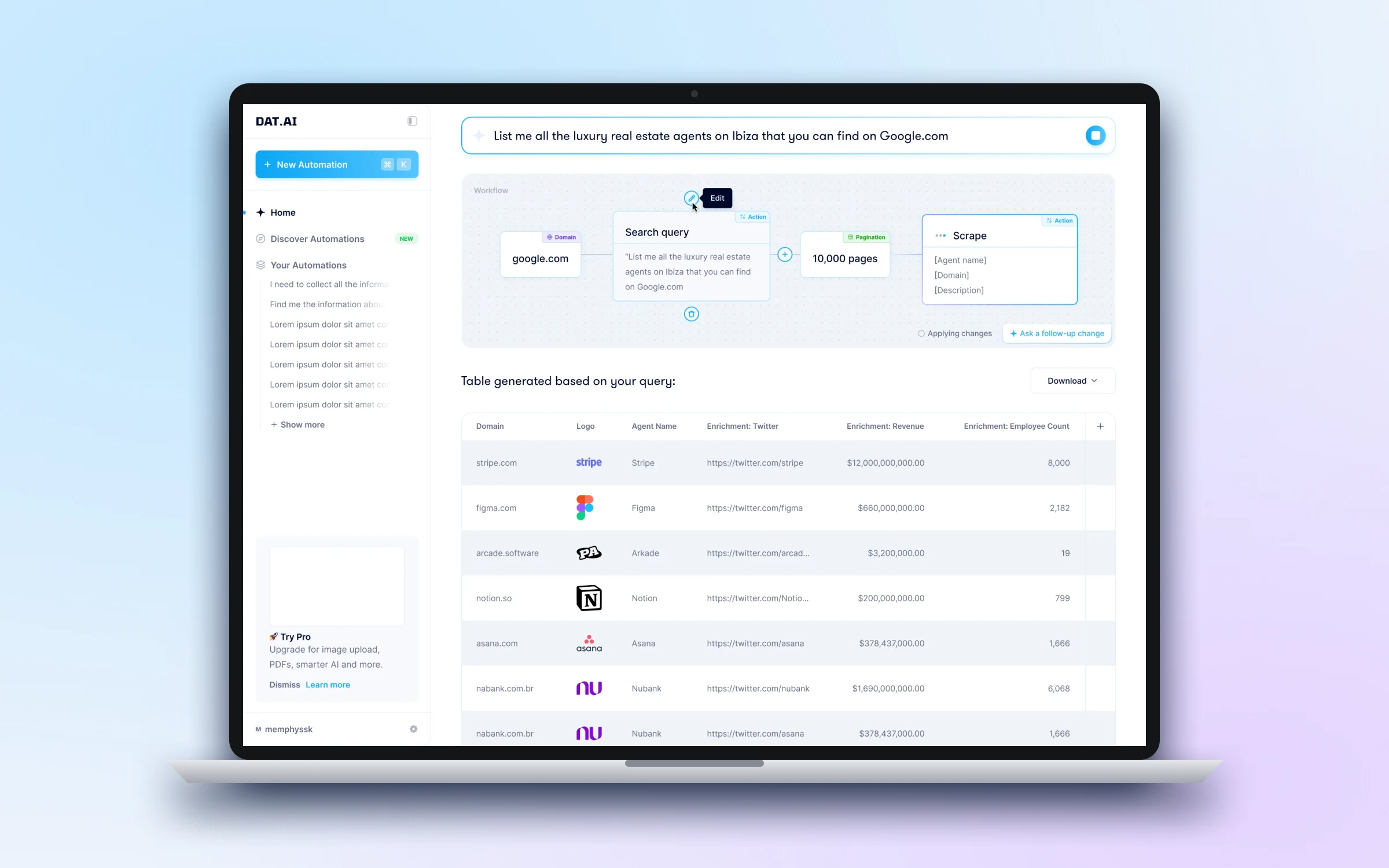
Collecting data from the web usually means writing scrapers, wiring up proxies and cleaning the results by hand. Dat.ai's idea was to hide all of that behind one prompt: type "list me all the luxury real estate agents on Ibiza you can find on Google.com", and get back a table.
The product has since grown into browser infrastructure for AI agents, with real Chrome sessions over MCP, and counts SOAX's CPO among its advocates. The interface patterns we set up (prompt first, visible workflow, editable steps) carried into that direction.
02
Problem and business goals
AI that acts on your behalf is only useful if you can see and trust what it's doing. A prompt that returns a table out of nowhere feels like magic, until the data is wrong and there's no way to tell why.
Business and product goals
- 01Make data collection as simple as writing a sentence
- 02Show the steps the AI takes, so people can trust and correct the result
- 03Let people reuse and share automations instead of starting from scratch
03
Design
The design rests on one decision: the AI's plan is always visible. Between the prompt and the table sits a workflow of plain blocks (source, search query, pagination, scrape) that people can read, edit and extend.
Part 01
From a prompt to a table
The answer arrives as a workflow and a table. Each block is labelled by type (Domain, Action, Pagination), the table fills in with enriched columns like revenue and employee count, and a follow-up prompt changes the plan without starting over.
Part 02
Editing what the AI decided
Any step can be opened and changed. Editing a search query opens a side panel, the sidebar collapses to give the workflow room, and saving re-runs the process from that step.
Part 03
A library of automations
Good workflows shouldn't be rebuilt every time. Discover Automations collects ready-made ones that can be searched and sorted; each has its own page with the workflow, a description, tags and similar automations, and one button to try it.
Design-system decisions
- Blocks that say what they are
- Workflow cards carry a type badge and a consistent structure, so a long workflow stays readable at a glance.
- One accent, used sparingly
- A single bright blue marks what's interactive or running; everything else stays neutral to keep data-heavy screens calm.
- Every state designed up front
- Buttons, inputs, menus and sidebar items each have default, hover, active and disabled states, so engineers never had to guess.
04
Outcome
Dat.ai launched and is live at dat.ai, now focused on giving AI agents reliable web access, with paid plans and its first customers.
Shipped
- —Prompt-to-table flow with a visible, editable workflow
- —Automations library and detail pages
- —Design system