Ai Kids Peru
The question
How do you explain AI to a ten-year-old without a single lecture?
Ai Kids Peru teaches 10-year-olds the ideas behind artificial intelligence through short, playful lessons. I took it from the founder's rough mockups to a gamified web app with four lesson tracks, a robot tutor and a design system.
- Role
- Product Designer
- Team
- Worked directly with the founder
- Timeline
- Jan — Mar 2024
- Platform
- Web app for classroom laptops and tablets
- Client
- Ai Kids Peru
- Services
- PRODUCT DESIGN
- UX RESEARCH
- GAMIFICATION
- DESIGN SYSTEM
- lesson tracks: Abstraction, Decomposition, Privacy & Security, Environmental Impact
- 4lesson tracks: Abstraction, Decomposition, Privacy & Security, Environmental Impact
- kids' learning apps studied, from Duolingo to Khan Academy Kids
- 10+kids' learning apps studied, from Duolingo to Khan Academy Kids
- grade: everything written and designed for 10-year-olds
- 5thgrade: everything written and designed for 10-year-olds
01
Context
AI is usually taught as a technical subject, if it's taught at all. The founder of Ai Kids Peru wanted Peruvian children to learn its principles early, starting in 5th grade, through a curriculum built with AI professionals, teachers and pedagogical designers.
He came with a written scope and a set of rough mockups: a login screen for students, teachers and parents, a lesson about maps, and lots of ideas for keeping kids motivated, like building and trading robot parts.
02
Problem and business goals
The hard part wasn't the screens. It was making abstract ideas like decomposition or data privacy feel concrete and fun to a 10-year-old, without turning the app into a lecture.
Business and product goals
- 01Design an MVP the founder could demo to schools: student app, lesson flow and a clickable prototype
- 02Make AI concepts approachable for 5th graders
- 03Keep kids coming back with progress, rewards and a sense of ownership
User goals
- 01Students: learn something new in a few minutes, and feel smart doing it
- 02Students: earn rewards and build something of my own
- 03Teachers and parents: see how a child is progressing
03
Discovery
The project started from the founder's written scope and a handful of rough mockups: a login screen for students, teachers and parents, and a geography lesson about maps. Before designing anything I built a moodboard of more than ten learning apps for children, looking at how each one explains things, rewards progress and keeps instructions short enough for kids to read.
Research
- Duolingo and Busuu
- Short lessons on a visible path, with streaks and XP, make progress feel tangible.
- Khan Academy Kids, Pok Pok and CodeSpark
- Characters and play beat text: kids learn by doing, with as little reading as possible.
What we learned
- 01Each lesson should be a small game with one clear action, not a page of text
- 02A friendly character can explain, hint and celebrate, so the interface doesn't have to
- 03Every exercise should link back to the real AI concept it teaches
Where it started
Before
After
Before
After
04
Design
The first version followed the founder's mockups closely: a general school app with Geography, Math and Biology courses and map questions. It worked, but it taught school subjects, not AI. We reshaped the product around four AI concepts, each with its own colour, path-style course map and set of exercises, while keeping the founder's best ideas: the course map, XP and streaks, and the robot.
Part 01
Abstraction: keep only what matters
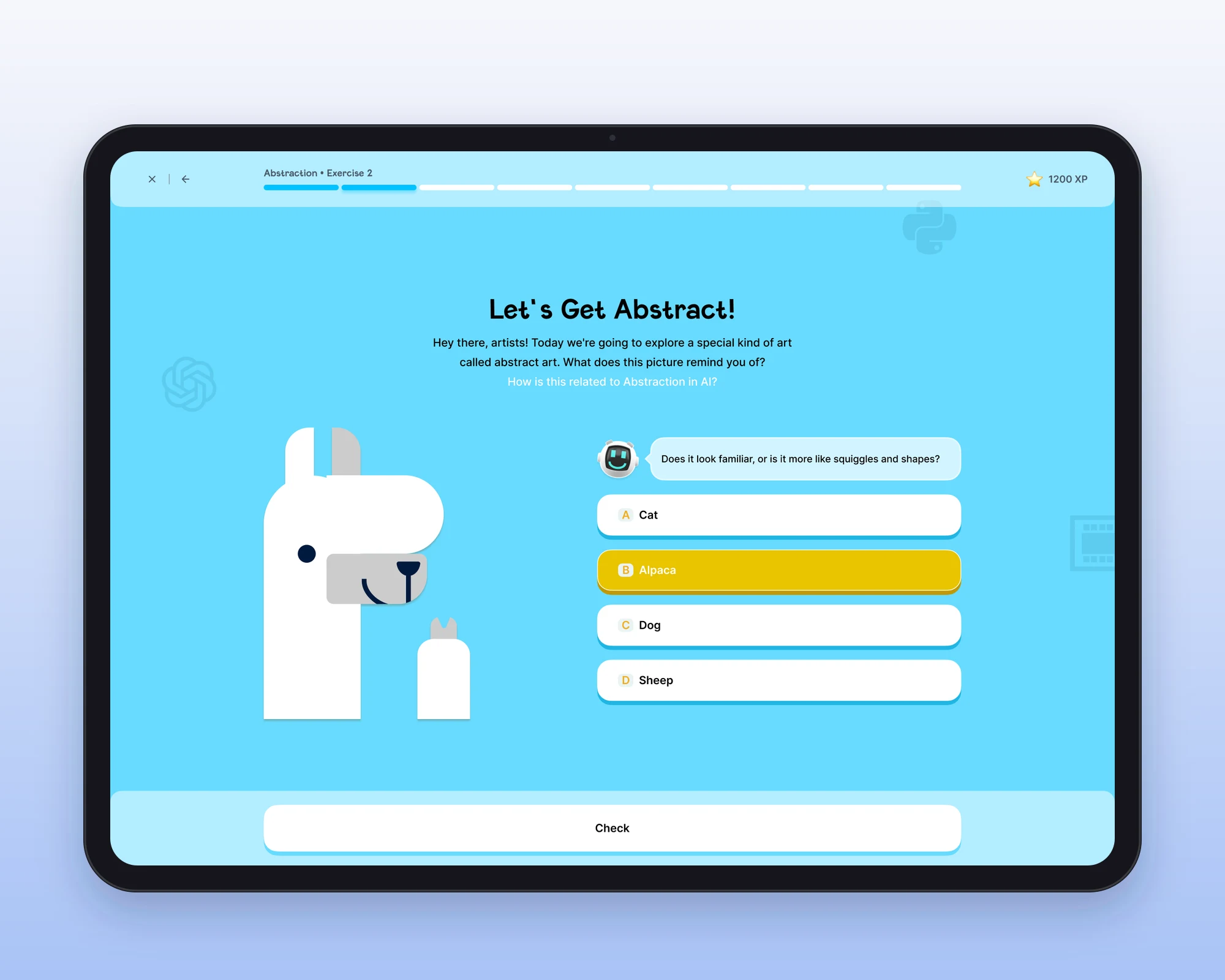
Abstraction is about ignoring detail to see the big idea, the way AI simplifies the world into patterns. Kids guess what a few flat shapes are meant to be (an alpaca), then strip a cat down to the fewest body parts that still read as a cat. The course map shows every exercise on one winding path, so they always know what's done and what's next.
Part 02
Decomposition: big problems, small steps
Decomposition means splitting a big task into steps a computer can follow. Kids pick the ingredients for Peruvian ceviche, then cook Lomo Saltado step by step in a chat with the robot, which only responds to clear, small instructions. Local dishes make an abstract idea feel familiar.
Part 03
Privacy & Security: protect your secrets
This track teaches kids to keep their information safe online. They decide what to do with a suspicious email asking for their password, then build a strong password from letter, number and symbol tiles while the robot tells them how secure it is.
Part 04
Environmental Impact: the two sides of AI
AI can help the planet but also uses a lot of energy. Kids learn the name for that effect, then sort what AI does for the Earth into a good side and a bad side, from electric cars and smart lighting to pollution and rising temperatures.
Part 05
A robot tutor and a robot to collect
A small robot guides every lesson: it hints, reacts to answers and cheers when a kid gets it right. Finishing a lesson earns XP and a new robot toy, a lighter take on the founder's idea of building and trading robot parts.
Design-system decisions
- One set of components, four colour themes
- Each track gets its own colour, so kids always know where they are, while buttons, answers and chat stay identical across the app.
- Chunky, tactile buttons
- A thick bottom edge makes every button look pressable, which matters for kids on touchscreens.
- Clear answer states
- Default, selected, correct, wrong and disabled each have a distinct colour, so feedback is instant without reading.
- Chat as a core component
- The robot's hints and conversations reuse one chat pattern, including editable replies, across every track.