Corner Table
The question
How do you become a regular in a city you've never been to?
Corner Table is a hospitality network that connects regulars with the people behind their favourite venues — so they can discover their favourite spots' favourite spots, anywhere in the world. We took it from a founder's notebook sketch to a developer-ready app.
- Role
- Product Designer
- Team
- Overspace design team, the founder and two developers
- Timeline
- 2024 — 2025 · 1 year
- Platform
- iOS app and landing page
- Client
- Corner Table
- Studio
- Overspace
- Services
- PRODUCT DESIGN
- DESIGN SYSTEM
- PROTOTYPING
- LANDING PAGE
- screens designed and prototyped across two user roles
- 155screens designed and prototyped across two user roles
- audiences in one app: Regulars and hospitality Insiders
- 2audiences in one app: Regulars and hospitality Insiders
- Corner Table regulars tested the app before handoff
- 10Corner Table regulars tested the app before handoff
01
Context
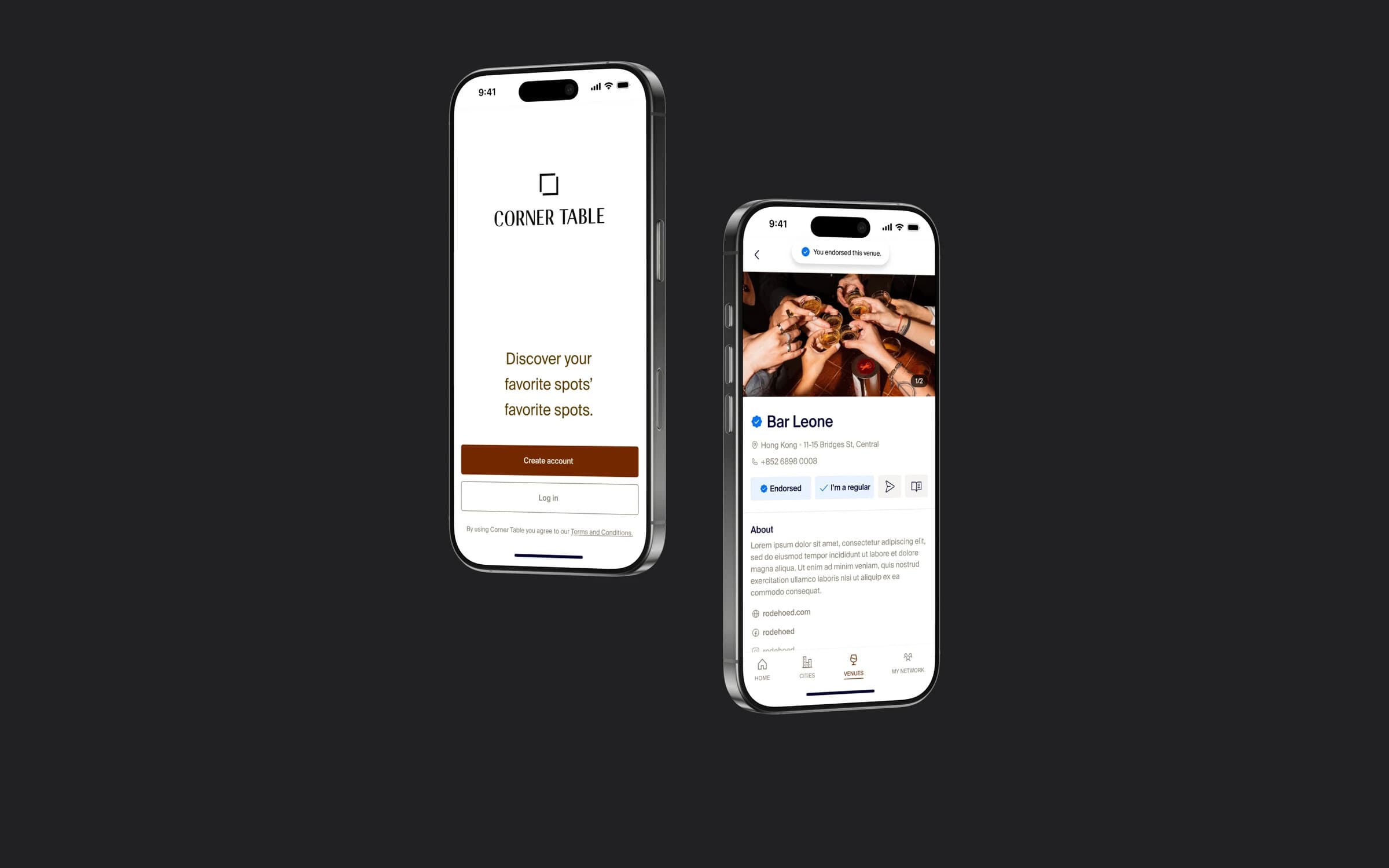
In hospitality, the best recommendations come from people who work in it: a bartender knows where other bartenders drink. Corner Table turns that word of mouth into a network. Regulars connect with industry insiders, insiders vouch for their best guests, and everyone discovers venues through people they trust.
The product grew out of Corner Table Restaurants, a New York hospitality group running restaurants since 2001. We worked with the founder for a year through Overspace — from a sketch in a notebook to a full app, design system and landing page, handed off to two developers.
Tools: Figma, Dropbox Paper, Trello and Slack.
02
Problem and business goals
Hospitality runs on relationships, but nothing was built around them. Finding a great place in a new city depends on knowing the right people, and being a regular stops at your own neighbourhood. The founder wanted an app where trust travels through people — and it had to serve two very different audiences at once.
Business and product goals
- 01Ship an MVP for Regulars first, then extend it to industry Insiders
- 02Grow the network through invites: QR code, SMS, email and short links
- 03Give venues one place to manage their profile, staff and regulars
- 04Build a reusable design system so new roles and screens are fast to design and build
User goals
- 01Regulars: find great venues anywhere through people I trust
- 02Regulars: be recognised as a regular at the places I love — and message them directly
- 03Insiders: vouch for my best guests and invite them in
- 04Insiders: manage my venues, staff and regulars
03
Discovery
The project started with the founder's own sketch of global search and a long list of ideas. Before designing anything, we turned them into a shared scoping document — every screen, its contents and open questions — and refined it together with the founder in comments.
Users
Regulars
Diners and travellers who want the regular treatment wherever they are. They search cities and venues, connect with insiders, and message venues directly.
Insiders
People who work in hospitality — owners, managers, bartenders, servers — verified by their venue. They manage venues and staff, and invite and vouch for their regulars.
Research
- Founder's sketch and idea list
- Search is the front door: one autocomplete for cities, venues and people, with room to connect or message without clutter.
- Screen-by-screen scoping document
- Every screen defined before design, with decisions made in comments — for example, a single notification switch versus advanced settings per notification type.
- Venue role mapping
- Insiders aren't one persona: we designed for the real roles in a venue — owner, general manager, bar manager, floor manager, host, server and bartender.
What we learned
- 01Trust is the currency — every venue shows who in your network endorses it
- 02Insiders need everything Regulars have, plus venue management
- 03Growth comes from invites — one QR code connects existing users or sends new ones to the App Store
- 04Being a regular is a status venues grant — so it needs an application and approval flow
04
Problem definition
- 01Finding a great place in a new city depends on knowing the right people — and most diners don't.
- 02Being a regular doesn't travel: recognition stops at your home venues.
- 03Venues have no simple way to recognise, invite and vouch for their best guests.
- 04Two audiences with different needs must share one coherent app.
05
From problem to solution
We phased the work: Regulars first, Insiders second. Once the design system and core screens were established, Insider screens reused the same components — which kept the second phase small.
The information architecture rests on four tabs — Home, Cities, Venues and My Network — with Inbox and Profile always one tap away. Onboarding branches on a single question: “Do you work in hospitality?”
Feature priorities
Use cases
Regular in a new city
Searches “Paris”, sees venues endorsed by people in their network, and messages one to book.
Regular at home
Applies to become a regular at a favourite bar; the venue approves or asks for more information.
Bartender
Invites a guest with a QR code and vouches for them with an endorsement.
Manager
Adds a new venue, uploads photos and menus, and manages staff and regulars.
Group of friends
Plans a night out in a group chat and CCs the venue so it can help.
Journeys, IA and flows
06
Design
The visual language borrows from a good restaurant: warm paper tones, deep brown accents, rich photography of venues and drinks, and a classic wordmark. We explored ten typefaces and several colour directions before settling on it.
Design-system decisions
- Colour tokens by role
- Text, surface, border and icon tokens — screens reference roles, not hex values, so the theme can change globally.
- Display, Body and Label type styles
- Three families of styles cover everything from city names to fine print.
- Components with states
- Buttons, inputs, dropdowns, filters and content cards — Insider screens were assembled from the same parts.
- One canvas: 393pt iPhone
- A single, consistent screen size kept the MVP focused.
07
Testing and iteration
Before handoff, the app was put in front of the people it's built for. The client organised a usability round with ten regulars of Corner Table Restaurants in New York, and the founder walked us through their feedback on a debrief call.
The feedback pointed to three gaps between finding a place and actually going there. We added three features to the build before it was handed to the developers.
How we tested
- Usability round with 10 regulars
- Ten regulars of Corner Table Restaurants in New York — the product's core audience — tried the app and gave feedback.
- Founder debrief
- The founder relayed the group's feedback to us on a call; we prioritised it together before changing the designs.
What we learned
- 01A recommendation is only useful if you can act on it — and acting on it meant leaving the app to call or text someone.
- 02Trust needs to be visible: people wanted to know who stands behind a venue or a regular, not just that it's listed.
- 03Text-only lists made venues hard to tell apart at a glance — and in hospitality, the look of a place is half the decision.
What changed
BeforeFinding a venue was a dead end — reaching it or the insider who recommended it happened outside the app
AfterMessaging: direct and group chats, with the option to CC a venue so it can help plan the visit
BeforeNo way to follow or vouch for people
AfterEndorsements: insiders vouch for venues and regulars, and every venue shows who in your network endorses it
BeforeVenue lists were text only
AfterA photo preview for every venue in lists and search results
08
Outcome
We handed over a complete, developer-ready app — Regular and Insider flows, a clickable prototype, a component library and landing pages — built by the client's two developers. The landing page is live at cornertable.app; the public launch of the app is in the client's hands.
Shipped
- —Regular and Insider app designs, end to end — 155 screens
- —Design system: colour tokens, type styles and components
- —Clickable Figma prototypes for both roles
- —Landing pages for regulars and the industry — live at cornertable.app
Not shipped
- —Visit history — logged as an idea, left out of the first version
- —Public app launch — pending on the client's side